Introduction:
This blog is the first in the series that I intend to write for Practical Pentest Labs (free access) practice machines.
The purpose of this blog is to document the steps I took to complete hacking tasks of Kenobi machine from Practical Pentest Labs and guide people looking to practice their penetration testing skills.
Tools Used:
Nmap
Process Followed:
After connecting lab through VPN, I selected the KEYNOBI machine as it was flagged as an easy target and indicated to have Web Application vulnerability. To check the webpage, I fired the browser and went to the webpage but there was nothing there. I then viewed the source of the page but to no use.

After browsing, I chose to scan the machine using nmap’s service detection”-A” option in order to identify the version of OS and web server deployed at the target.
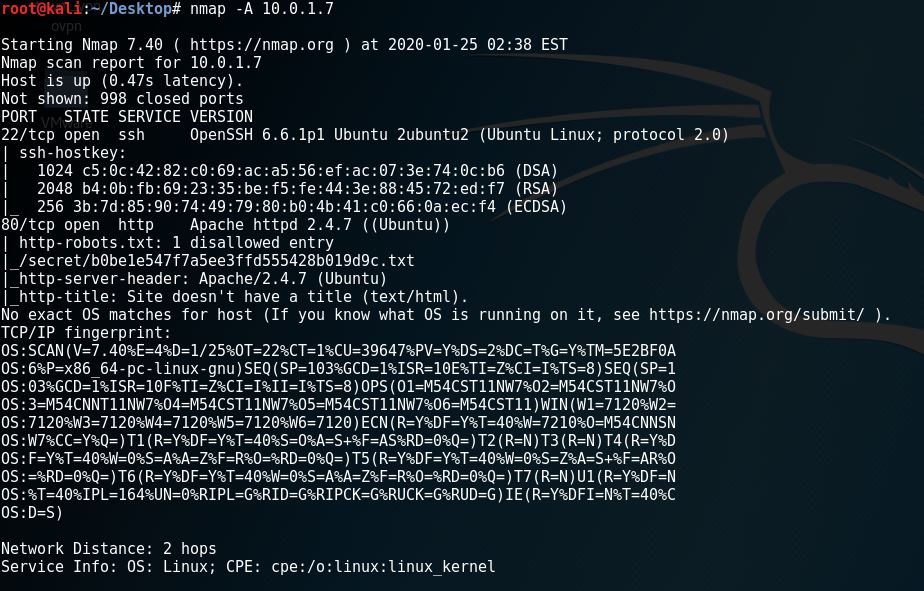
Upon review of the above output from namp scan, I noticed one interesting entry related to robots.txt file of the website.

I then opened the robots.txt page on the browser to see the contents of the file.
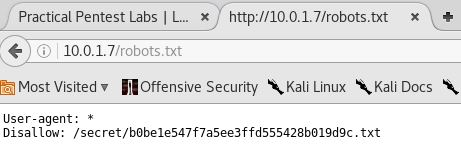
It was clear that there is something of importance in the Disallow entry:
Disallow: /secret/b0be1e547f7a5ee3ffd555428b019d9c.txt
I opened the file in the browser and there it was the congratulatory message and the token to be submitted on Practical Pentest Labs to claim my first points for successfully completing the task.
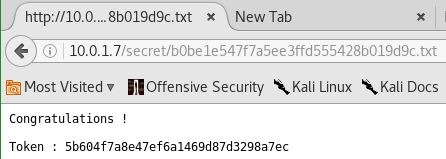
I copied the token and submitted it on the website to claim my first 100 points and the tick in the “Hacked” column.

 Blog
Blog 